What are conversions in Google Analytics?
11 years ago
A conversion is a completed action of an activity on your website such as a sign up, a download or a purchase. There are different categories of reports for conversions such as Goals, E-commerce, Multi-Channel Funnels and Attribution. Goals are defined in Google Analytics. E-commerce conversions are tracked with JavaScript code on your shopping cart page or pages that collect information on each transaction. Multi-channel funnels reports show the sequences of interactions such as clicks/referrals from channels that lead to each conversion. The interactions that lead up to a conversion is also called conversion paths. Attribution Model Comparison requires goals or e-commerce tracking to be enabled and lets you compare how effective your channels are.
Filed under: Digital Analytics→Documentation
Tags: conversions, digital analytics, e-commerce, goals, Google Analytics, multi-channel funnels, web analytics
What is 10KHits?
11 years ago
10KHits is a simple and easy-to-use scalable traffic exchange for webmasters who are looking for fast and affordable hits to their websites. Founded in 2011, 10KHits has already delivered billions of hits to thousands of clients worldwide. We help webmasters improve their website’s traffic, alexa ranking, SERPs and more. 10KHits is one of the most trusted traffic exchanges on the web today with plans ranging from free, $10 to $29 per month. Additionally, you’ll also get access to our knowledgebase filled with useful information on search engine optimization, search engine marketing, social media marketing, website performance and digital analytics at no additional cost. Where else can you get all this for free?
Filed under: Documentation→Getting Started
Tags: 10khits, about, alexa, billions, digital marketing, free, getting started, marketing, scalable, sem, seo, social media, traffic exchange
How it works?
11 years ago
10KHits offers three different plans: Basic (Free), Pro ($10/mo) and Business ($29/mo). If you are a Basic member, you’ll receive your 100 sign up points upon sign up. You’ll also earn 80% of each hit back to your available points balance. If you don’t have the time or resources to surf, you can purchase one of our subscription plans for 50,000 – 200,000 monthly traffic points and receive 120% – 200% of each hit back to your websites depending on your subscription plan.
10KHits is a scalable traffic exchange that lets you decide how long you want your visitors to stay on your website from 10 seconds (1 point per hit) to 60 seconds (6 points per hit). Each point is equivalent to a 10 second visit.
To start earning points and receiving hits, you’ll need to download and run our recommended program called10KHits Exchanger. You can also surf directly from our website (not recommended).
Filed under: Documentation→Getting Started
Tags: 10khits, basic, business, earn, exchange, extra, free, getting started, how, how it works, it, plans, points, pro, scalable, slots, traffic, traffic points, website, website slots, websites, works
What are the key advantages for using 10KHits?
11 years ago
Besides all the wonderful things we mentioned before like visit duration, we also offer scalability and features such as maximum hits per hour, white label traffic and geo-location.
Maximum hits per hour lets you decide on a maximum limit for the amount of hits you want to receive per hour for your campaigns. Whether you want to use up your points quickly or slowly, you can choose from 5 hits to 500 hits per hour.
If you are a traffic reseller, you may want to upgrade to our Pro or Business plan as it includes white label traffic. White label traffic allows you to mask where your traffic comes from. For example, instead of showing the hits you received as 10KHits (default setting), you can customize the source so that it shows up as your company/business name or make it show up as anonymous/direct traffic in Google Analytics.
With the business plan, you’ll be able to select the geo-location for your traffic. You can set up your campaigns to receive traffic from countries where it is most abundant on our network such as United States, France, Vietnam, Indonesia and Vietnam.
Another key advantage that all plans have is booster packs. You can scale any plan to whatever size you want by buying extra website slots that will lasts 30 days or add extra traffic points to your account each month. Whether you need an additional 40 website slots on your free account or 10,000,000 traffic points on your Pro account, all your needs can be fulfilled with 10KHits booster packs.
Filed under: Documentation→Getting Started
Tags: 10khits, advantages, basic, booster, booster packs, business, custom source, features, geo, geo-location, getting started, key advantages, location, pro, scalable, scale, traffic source, white-label
How do I upgrade my free Basic account to Pro or Business plan?
11 years ago
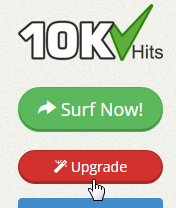
To upgrade your free account to Pro or Business plan, just click on the red “Upgrade” button on the left sidebar of the dashboard after logging into your account.
Click the “Upgrade Now” button for the plan you wish to subscribe to.

On the Review Your Order page, you’ll be able to add a promo code if you wish. When you are done, you can pay by clicking on PayPal or Payza subscribe.

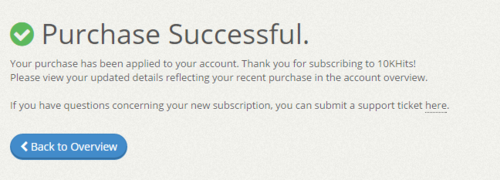
After payment, you will be sent to the Purchase Successful page where you should go to account overview to see your updated plan.
Filed under: Documentation→Getting Started
Tags: 10khits, basic, basic account, basic plan, business, business plan, buy, free, getting started, plan, plans, pro, pro plan, purchase, upgrade, upgrade account, upgrades
How do I upgrade my Pro account to Business plan?
11 years ago
To upgrade your Pro account to Business plan, just click on the red “Upgrade” button on the left sidebar of the dashboard after logging into your account.
Click the “Upgrade Now” button below the Business Plan.
Depending on how many days are remaining on your Pro account, you’ll receive a pro-rated discount/credit for upgrading to business plan for the first month.

On the Review Your Order page, you’ll be able to add a promo code if you wish. When you are done, you can pay by clicking on PayPal or Payza subscribe.
After payment, you will be sent to the Purchase Successful page where you should go to account overview to see your updated plan.
Filed under: Documentation→Getting Started
Tags: 10khits, account, account upgrade, accounts, business, business plan, buy, discount, getting started, plan, plans, pro, pro plan, pro-rata, pro-rata credit, purchase, rata, upgrade, upgrades
How do I add booster packs to my account?
11 years ago
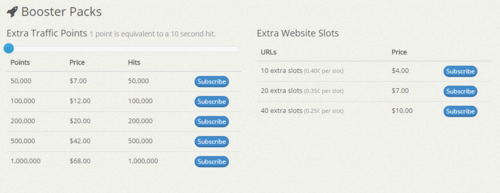
To add booster packs such as extra website slots or extra traffic points to your account, log into your dashboard. Go to the upgrade page and scroll to the very bottom.
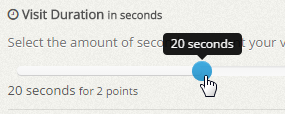
You can use the slider to see how much hits you would receive if you set your visit duration higher. The slider is for reference only and you can always change the visit duration in the Manage Site settings to increase or decrease the amount of hits you would get out of your points.
Filed under: Documentation→Getting Started
Tags: 10khits, account upgrades, booster, booster pack, booster packs, boosters, extra points, extra slots, extra traffic points, extra url slots, extra website slots, getting started, points, sites, slot, slots, traffic points, upgrade, upgrades, website, websites
How can I increase my website slot limit?
11 years ago
You can increase your website slots in two ways. One way is to upgrade your account to Pro or Business. With a Pro account, you’ll get 10 website slots and with a Business account you’ll receive 45 website slots. If you need additional website slots for your account, you can also buy extra slots from booster packs. You can buy 10 extra slots for $4, 20 extra slots for $7 and 40 extra slots for $10. You can upgrade your account and buy booster packs by clicking the red “Upgrade” button on the left side of the dashboard after logging into your account.
Scroll to the bottom of the page to view our boosters.
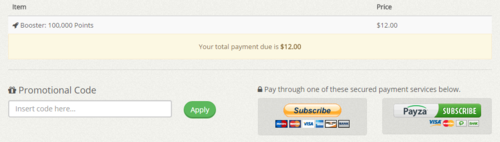
The extra website slots booster pack is a monthly subscription that will continue to be renewed every 30 days until unsubscribed or cancelled. Click on the “Subscribe” button of the booster pack you want to purchase to go to the Review Your Order page. Here you can add a promo code or checkout your order by using PayPal or Payza subscribe.
After subscribing, you should be sent back to the Purchase Successful page. From here, you can check the account overview to see that your account has been upgraded. You may buy booster packs as many times as you like to fit the desired size of your websites or business.
Filed under: Documentation→Getting Started
Tags: 10khits, account upgrades, booster, booster packs, boosters, buy, buy booster packs, extra slots, extra website slots, getting started, purchase, sites, slot, slots, upgrade, URL slots, website slots, websites
How can I purchase extra traffic points?
11 years ago
You can purchase extra points on the upgrade page with one of our booster packs. You can buy 50,000 points for $7, 100,000 points for $12, 200,000 points for $20, 500,000 points for $42 and 1,000,000 points for $68. Similar to increasing your website slots, you can buy booster packs by clicking the red “Upgrade” button on the left side of the dashboard after logging into your account.

You can move the slider to the right to see how many hits you would get if you change your visit duration. The slider is for your reference only and does not change the amount of hits you are purchasing. Once purchased, you can set the visit duration of your website campaigns individually.

The extra traffic points booster pack is a monthly subscription that will add extra traffic points to your account every 30 days until unsubscribed or cancelled. Click on the “Subscribe” button of the booster pack you want to purchase to go to the Review Your Order page. Here you can add a promo code or checkout your order by using PayPal or Payza subscribe.
After subscribing, you should be sent back to the Purchase Successful page. From here, you can check the account overview to see that your account has been upgraded. You may buy booster packs as many times as you like to fit the desired size for your websites or business.
Filed under: Documentation→Getting Started
Tags: 10khits, account upgrade, booster, booster packs, buy, extra points, getting started, hits, points, purchase, traffic, traffic points, upgrade, upgrades, web hits, web traffic
Introduction to the 10KHits Dashboard Overview
11 years ago

The 10KHits Dashboard Overview includes analytic tools such as line graphs that will help you keep track of your account summary. This is also where we will keep you updated with the latest announcements such as system updates and special offers at the top of the page. The dashboard includes 8 different elements:
1. Update Profile – click on the Get Started button to update your profile.
2. Receive Hits – click on the Add Site button to add your first website campaign and start receiving hits.
3. Earn Points – download the exchanger to quickly start earning traffic points for more hits to your websites.
4. Account Type – shows you which plan is currently applied to your account. Click the plan to quickly view a list of plans you can purchase.
5. Available Points – shows you how many traffic points you have on your account. Click on this number to quickly purchase more traffic points via booster packs.
6. Remaining URLs – shows you how many website slots are remaining that you can use to create website campaigns. Click on this number to quickly purchase more website slots via booster packs.
7. Active Websites – shows you the number of active website campaigns that are running on your account.
8. Weekly Analytics – displays two line graphs for the points earned and hits received from your account in the past 7 days.
Filed under: Documentation→Getting Started
Tags: 10khits, account summary, dashboard, dashboard overview, getting started, introduction, overview