Why you should prioritize visible content on your pages
10 years ago
To increase your page speed, try to reduce the size of the above-the-fold content. The above-the-fold content is implying the upper half of the front page of your website that doesn’t require you to scroll down the page to see. Many websites that seem very fast are often just as large as slow websites. They just prioritize the above the fold content so that the site appears to load fast. Users love webpages that show up quickly and this is why you should prioritize visible content on your pages. Always load the above the fold content first. The footer is at the bottom of the page for a reason so it doesn’t make any sense to add many external files or images to your footer. The user will rarely see your footer. Structure your HTML so that it loads the critical above-the-fold content first and reduce the amount of data used by your resources.
Filed under: Documentation→Website Performance
Tags: above-the-fold, page speed, prioritize visible content, website performance
Why you should remove render-blocking JavaScript
10 years ago
External script can cause the parser to wait for the resource to download which can delay the time for the page to render. You should avoid and minimize the use of blocking Javascript, especially external scripts that need to be fetched before they are executed. You can inline small scripts to avoid extra network requests similar to how we optimize CSS delivery. Another solution to this is by making JavaScript asynchronous or by deferring the JavaScript.
Filed under: Documentation→Website Performance
Tags: javascript, optimize java, page speed, render-blocking, website performance
Why you should use asynchronous scripts
10 years ago
By making sure you are using the asynchronous version of your scripts, your page speed and improve greatly. Many scripts such as Twitter, Facebook, Disqus and Google Analytics are async by default. For those that are not async by default, you should make an effort to see if they have an async version of their script.
Filed under: Documentation→Website Performance
Tags: async, asynchronous, page speed, scripts, website performance
Why you should avoid using plugins such as Flash
10 years ago
To increase your website’s usability, you should avoid the use of special types of web content such as Flash, Java or Silverlight. Sometimes these plugins will cause your website to hang or crash and may also cause security incidents in browsers. Furthermore, many browsers restrict such plugins.
Internet Explorer runs without plugins in Windows UI mode.
Chrome intends to remove most plugins.
Firefox will prompt users before running most plugins.
There are many web technologies that can substitute these plugins now and will not cause your website to hang or crash.
Filed under: Documentation→Website Performance
Tags: flash, java, page speed, plugins, website performance
Why you should configure the viewport on your website
10 years ago
To improve your website’s usability for mobile devices, you should configure the viewport on your website. Simply add this snippet of code into your website’s
section:By doing so, your pages will be optimized well on mobile devices. Viewport controls how the webpage is displayed on a mobile device so that it uses the device’s screen width making it easier to browse and read the content of your pages.
Filed under: Documentation→Website Performance
Tags: meta, mobile, page speed, viewport, website performance
Why you should adjust size content to viewport
10 years ago
Sometimes you may have content on your page such as an image that has a width that is larger than the device’s width causing the horizontal scroll bar to show up. It is important to adjust the size content to fit within the width of the viewport so that the user does not need to scroll horizontally to see the entire page. You can do this by using relative width sizes such as:
width:100%
Making images and content responsive is one way to improve the usability of your website.
Filed under: Documentation→Website Performance
Tags: adjust size, mobile, mobile usability, relative sizes, usability, viewport, website performance
Why you should size tap targets appropriately
10 years ago
We have all experienced a website on our mobile device that had tightly packed links or buttons making it difficult to accurately press on a touchscreen. You may click on one link but it sends you to a link that is next to it that you did not want to go to. This is why you should space your links appropriately so that the user does not click on a link he/she wasn’t aiming for. This also makes it so that the user does not need to zoom in to carefully pick the link they want to go to. Make the important tap targets larger than the ones that are not important. Make sure that there is proper spacing for smaller tap targets. Designing a good user interface will improve the usability of your website tremendously.
Filed under: Documentation→Website Performance
Tags: mobile, mobile usability, size tap targets, usability, user interface, website performance
Why you should use legible font sizes
10 years ago
To improve the usability of your website, you should always use a base font size of 16 CSS pixels. Furthermore, use sizes relative to the base size to define the typographic scale. It is common practice to use a line-height of 1.2em to have the proper vertical space between characters. Lastly, restrict the number of fonts used. Having too many fonts and font sizes can give your page layout a messy look.
Filed under: Documentation→Website Performance
Tags: font size, font sizes, mobile usability, usability, website performance
What are content delivery networks (CDNs)?
10 years ago
A CDN is a system of distributed servers that deliver webpages and other content to a user based on geographic locations of the user, the origin of the webpage and a content delivery server.
CDNs can also provide protection from DDoS attacks and security for your website as well as improving website performance and speed.

One CDN service that we recommend using is CloudFlare. You can sign up to CloudFlare athttps://www.cloudflare.com.
You can also try out other CDN services such as MaxCDN, EdgeCast, Amazon CloudFront CDN and more. Check to see which one fits the best for you.
Filed under: Documentation→Website Performance
Tags: cdn, cloudflare, ddos, page speed, protection, security, website performance
Why should I validate the markup of my website?
10 years ago
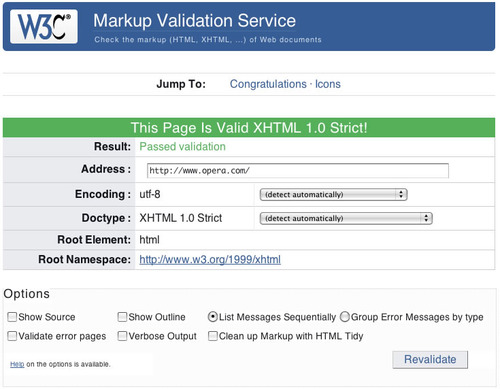
The W3C (World Wide Web Consortium) Markup Validation Service lets you check your web documents for markup validity in HTML, XHTML, SMIL, MathML, etc.
To analyze your web documents, go to http://validator.w3.org/ and input the web address of the web document you want to validate. This service will let you know how many markup errors are on your website and how to fix them. If you can fix all the errors on your webpages, your page will be W3C validated and passed.
Validation helps future-proof your website making sure it will work on browsers for years to come. It also eases maintenance and teaches good practices. It is a sign of professionalism. Validation can be used to check whether the code of your website is clean work from a seasoned HTML author.
Filed under: Documentation→Website Performance
Tags: markup, markup validation service, validate, w3e, website performance, website validation