Do you offer bigger plans than the Business plan?
11 years ago
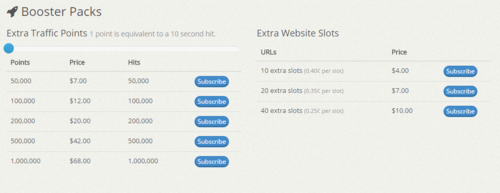
The biggest plan we offer is our Business plan however you can scale it by adding multiple booster packs to make your plan as big as you’d like. For example, you can buy the Business plan and purchase 5 booster packs of the 40 extra URL slots and 5 booster packs of the 1,000,000 extra points. As long as you are subscribed to these booster packs, you’ll have 200 extra URL slots and 5,000,000 points on top of your Business account every month.
To buy booster packs go to the Upgrades tab from the left sidebar of the dashboard and scroll to the bottom of the page. Click on the Subscribe button of the booster pack you want to purchase and pay using one of the payment systems available.
Filed under: Documentation→Getting Started
Tags: bigger plans, booster, booster packs, extra points, extra slots, getting started, packs, traffic points, upgrades, website slots
Can I open multiple accounts for personal and business use?
11 years ago
You are allowed 3 accounts per IP address however, we may suspend your accounts or URLs if we believe you are abusing our system.
Filed under: Documentation→Getting Started
Tags: account, accounts, getting started, multiple, multiple accounts
How can I submit a testimonial to 10KHits?
11 years ago
Please log into your account and go back to our homepage. Scroll down to the “What People Say” section. Here you will see a button that is only displayed when you are logged on. Click on “Submit your testimonial” button.
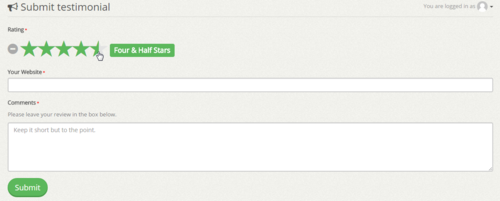
Give a rating, input your website URL and review our service then click the submit button. We will handpick the testimonials to be featured on our homepage. Featured testimonials will display your review including your website URL. We may also reward points for your testimonials.
Filed under: Documentation→Getting Started
Tags: getting started, reviews, submit testimonials, testimonial, testimonials
Am I automatically charged at the end of every 30 days?
11 years ago
If you are still subscribed to our service, you will be charged after 30 days on a month-to-month basis. All of our upgrade plans as well as our booster packs are 30 day subscriptions but you can cancel the subscription any time you like in Paypal or Payza. If you are only looking for a one time purchase be sure to unsubscribe any time during your first month.
Filed under: Documentation→Getting Started
Tags: • getting started • automatically charged • subscription
Can I pay months in advance?
11 years ago
No, we only allow month-to-month payments. If you’d like to keep using our service, you’ll need to keep the automatic subscription payments active and pay on time at the end of 30 days.
Filed under: Documentation→Getting Started
Tags: advance pay, getting started, subscription
What forms of payment do you accept?
11 years ago
We currently accept PayPal and Payza payments. These payment systems accept credit/debit cards as well. If you’d like to use your debit/credit cards, you must add them to your PayPal or Payza account and use them from there. PayPal accepts Visa, MasterCard, American Express and Discover. Payza accepts Visa and MasterCard.
If you cannot pay using Paypal or Payza please contact support to explore other options.
Filed under: Documentation→Getting Started
Tags: credit cards, getting started, payments, paypal, payza
Can you charge my Paypal or Payza on a specific date?
11 years ago
No. When you subscribe to our service, we will automatically charge for your subscriptions after 30 days. If the payment is not met then your plan or booster packs will be discontinued until you subscribe to them again.
Filed under: Documentation→Getting Started
Tags: charge, getting started, payments
Am I charged if I don’t have any active websites on my account?
11 years ago
Yes. As long as you are subscribed to the plans and/or booster packs, you will be charged whether or not you choose to use our services. It is your sole responsibility and duty to unsubscribe to our services when you decide not to use them anymore. Unused points will remain in your account’s points balance indefinitely. PayPal and Payza will usually send an invoice to remind you of any upcoming payments.
Filed under: Documentation→Getting Started
Tags: getting started, payments
Do you offer any discounts or promo codes?
11 years ago
Yes. We’ll let you know about our latest promo code at the top of the page after you have logged on. We usually offer promo codes during or near holidays. You can also check our blog or social media pages for some awesome deals.
To apply a promo code, on the Review Your Order page you will see a promotional code box. Insert the code which is case sensitive and click Apply.
If the promo does not work, it is possible it is expired or that you insert the wrong code. Make sure that the code is insert exactly how you see it (case sensitive). You can also contact our support team if you believe the code is having technical issues.
Filed under: Documentation→Getting Started
Tags: coupons, discounts, getting started, promo codes
What is website performance?
11 years ago
Website performance plays a major role on how long users stay on your website. A slow website can infuriate your visitors from coming back to it. Many large companies, especially the huge e-commerce sites like Amazon are obsessed with making sure that their websites are available 24/7 and loading quickly. Downtime for a huge website like Amazon is estimated to cost the company $29,000 dollars per minute. In 2007, Amazon’s website went down for 2 hours which was estimated to cost the company $3.48 million dollars. Even If you are not a big company like Amazon, you should consider optimizing your site for better performance and to keep your visitors happy. If your website crashes frequently or takes 10-15+ seconds to load, you should definitely try some of our methods outlined in our website performance articles.
Filed under: Documentation→Website Performance
Tags: website performance