How do I manage my site?
10 years ago
To edit your website campaigns, click on Websites tab in the left side bar.
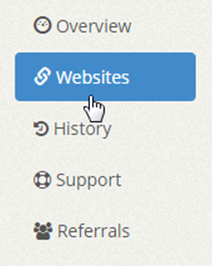
Click on the gear icon on the right of the website campaign panel that you want to manage and click on the Manage Site option.

Filed under: Documentation→Getting Started
Tags: 10khits, edit, edit URLs, getting started, manage, manage site, my URLs, site, URL
How do I manage my URLs?
10 years ago
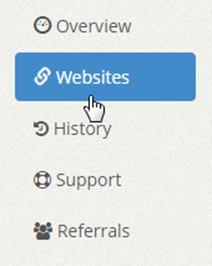
To manage your websites on 10KHits, click on the “Websites” tab on the left sidebar of the dashboard after logging into your account. Here you will find a list of websites you have added and website slots remaining on your account.
By each website campaign there is the status of your campaign as follows:
Active campaigns that are currently receiving hits will have a green checkmark icon by it.
Paused campaigns will have a yellow minus icon by it.
Suspended campaigns will have a red exclamation icon by it.
Expired campaigns will have a gray X icon by it.

We have also listed some other useful information to help you quickly view your campaign settings without having to expand the panel or by going into the Manage Site settings. You may see some icons and numbers on the right of the panel. The icons help you know whether your campaign has white label traffic source (paper airplane icon) or geo-targeting (globe icon) enabled. The first number from the left represents the visit duration and the second number represents the Maximum Hits per Hour for that campaign.
For example, the first campaign uses 60 seconds visit duration and a maximum hits per hour of 500.
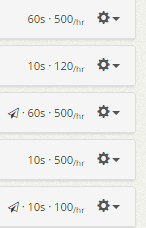
To manage a website campaign, simply click the gear icon on the right side of the panel. A drop down menu will show up in which you can manage site, pause site, create similar or delete site.
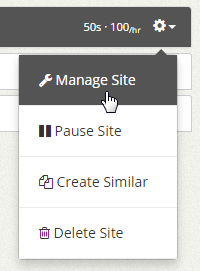
If you click the “Manage Site” option, you’ll be able to change the visit duration, maximum hits per hour, hits limit, traffic source (Pro and Business only), geo-targeting (Business only) and content screening.
Filed under: Documentation→Getting Started
Tags: create similar, delete, edit, getting started, manage, manage URLs, my URLs, pause, settings, URL
How come the line graphs and payment history does not match the current time/day?
10 years ago
We go by the time zone on our system which is Pacific Time zone. The line graphs and payment history may be listed a day behind but you can rest assure that what you see is always current and up-to-date.
Filed under: Documentation→Getting Started
Tags: getting started, line graphs, payment history, time zone
How do I expand/collapse all of my website campaign panels?
10 years ago
At the top right of the Websites page right below the +Add Site button, you’ll see a link called “expand all”. Click that link to expand all panels for your website campaigns. To collapse all the website campaign panels, click the “collapse all” link.


Filed under: Documentation→Getting Started
Tags: 10khits, campaign, campaign panels, campaigns, collapse, collapse all, expand, expand all, getting started, panel, panels, URL panels, website, website campaign panels, website panels
What is visit duration?
10 years ago
Visit duration is how long you want each visit to last. If you set the visit duration for one of your websites to 60 seconds, people will stay on your page for 60 seconds before leaving the page. You can set the visit duration to 10, 20, 30, 40, 50 or 60 seconds at the price of 1, 2, 3, 4, 5 and 6 points respectively.
Filed under: Documentation→Getting Started
Tags: 10khits, getting started, visit duration
What is maximum hits per hour?
10 years ago
Maximum hits per hour lets you restrict how many hits the website will receive in an hour before the campaign stops receiving hits within that hour and is restarted for the next hour. For example, if you set the maximum hits per hour to 300, you will never receive more than 300 hits per hour. This means you’ll get at most 7200 hits per day because 300 x 24 hours = 7200 hits a day. Keep in mind that this does not mean you will receive 300 hits every hour. You could receive less than 300 hits per hour depending on how much activity the network is getting.
IMPORTANT: Changing the maximum hits per hour setting is not immediate and will take in effect in the next hour. If you wish to update it immediately, you’ll need to recreate the campaign and delete the old one. Our system will only update this setting each hour. You may also pause the campaign and wait for the next hour to resume.
Filed under: Documentation→Getting Started
Tags: 10khits, getting started, hits, hour, maximum, maximum hits per hour, mhph, per
What is hits limit?
10 years ago
Hits limit is a useful setting to allocate how many hits you want a certain website to receive in its lifetime. This is a good feature for traffic resellers or people who own multiple websites and webpages. There are two options available: send as much traffic as possible or stop traffic after reaching limit.
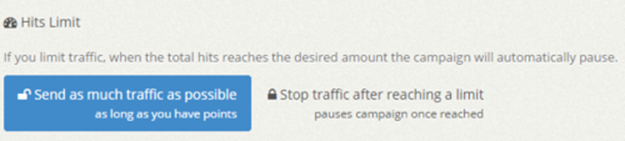
The first option is basically uncapping your campaign. You’ll receive as many hits for that URL as long as you have points. Once you run out of points, you will stop receiving hits.
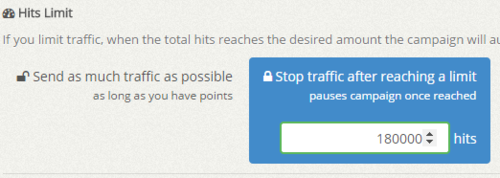
The second option lets you allocate a hit limit to that website in its lifetime. This is good setting for accounts that have multiple URLs. For example, if you have 3 different website campaigns running and you just purchased 100,000 points, you can set one website campaign to receive a 5,000 hit limit at 60 seconds visit duration (30,000 points), another with 15,000 hit limit at 20 second visit duration (30,000 points) and your last campaign can have a 40,000 hit limit at 10 second visit duration (40,000 points). Keep in mind that each hit will cost you 1 – 6 points each depending on your visit duration settings. You can always manage/edit your campaign settings if you need to change the hit limit.
Filed under: Documentation→Getting Started
Tags: 10khits, campaign, getting started, hits, hits limit, lifetime, limit, multiple, resellers, settings, traffic, website, websites
What is traffic source?
10 years ago
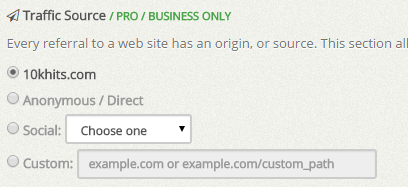
Traffic source (white-label) is a setting you can use to brand your hits or mask them. There are 4 options available for you if you have a Pro or Business account. By default, hits will show up as coming from 10Khits.com on web traffic tools such as Google Analytics. With a Pro or Business account, you have 3 additional options: Anonymous / Direct, Social or Custom.
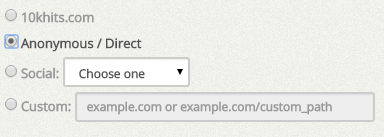
Anonymous / Direct will show your hits coming from the direct source. This is similar to if you typed the URL of your website in your browser and pressed enter.
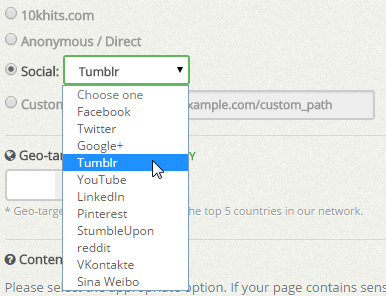
The social option lets you mask your hits from some of the top social media sites like Facebook, Twitter, Google+ and Tumblr. We will add to the list regularly so keep checking for more social sites!
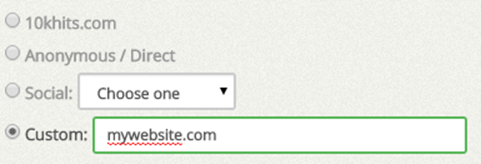
The custom source option is a way you can brand your hits with any name or URL you like. You can set it to anything you like as long as there are no special characters in it. With custom source, the hits will show up as what you’ve set in the custom box. In this example, the hits will display as coming from “mywebsite.com”.
Filed under: Documentation→Getting Started
Tags: anonymous, custom source, direct traffic, getting started, traffic source, white label traffic
What is geo-targeting?
10 years ago
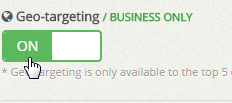
The geo-targeting setting lets you receive hits from the top 5 countries in our network. If you want to receive traffic from United States only, simply check mark the box and toggle geo-targeting to ON. You can checkmark multiple countries as well. When you’re done, don’t forget to save the changes!
Filed under: Documentation→Getting Started
Tags: 10khits, geo-targeting, getting started
What is content screening?
10 years ago
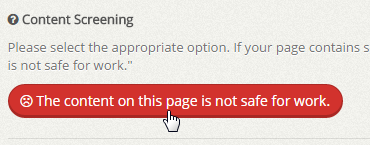
Content screening is a setting to mark and group webpages together that are NSFW (Not Safe For Work) such as pages that contain pornography, nudity or profanity. NSFW pages will only show to surfers who have the View NSFW pages setting on.
Filed under: Documentation→Getting Started
Tags: 10khits, content screening, getting started, nsfw