Introduction to the website campaign panel
10 years ago
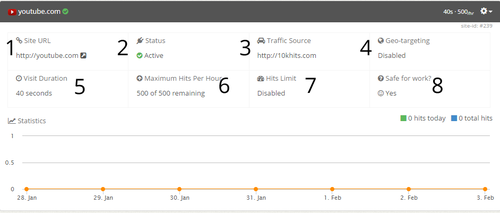
When you expand a website campaign panel, you’ll see 8 different boxes including a line graph at the bottom. Starting from the top left:
1. Site URL – the page that will receive hits from this campaign.
2. Status – the status of the campaign (active, paused, suspended or expired).
3. Traffic Source – hiding/masking where your hits are coming from.
4. Geo-targeting – whether geo-targeting is enabled or not. If enabled, it will list which countries the campaign is targeting.
5. Visit Duration – lists the duration of each hit from 10 to 60 seconds per hit.
6. Maximum Hits Per Hour – shows how many hits are remaining for the hour. For example, 75 of 500 remaining is the same thing as having received 475 hits out of the 500 maximum. There are still 75 hits remaining for you in the hour. Making changes to this setting will only take effect in the next hour. For instance, if you had 500 as your max but you change it to 300 after receiving 25 hits, it show up as 475 of 300 remaining. You will still use up a max of 475 hits this hour until the next hour begins and the setting is updated to 300.
7. Hits Limit – Displays whether you have a hits limit enabled on your campaign. If enabled, it will show the number of hits you’ve set for the lifetime of this campaign. Once that number is reached, the campaign will pause automatically.
8. Safe for Work? – displays whether the page is safe for work or not. Pages that are not safe for work are ones that contain pornography, nudity or profanity.
The line graph shows how many hits the website has received in the past 7 days for this campaign. There is also the number of hits today and hits total for the website campaign at the top right of the line graph in green and blue. You can zoom in for a more detailed graph by clicking and dragging your mouse. Click the reset zoom button to zoom out again.
Filed under: Documentation→Getting Started
Tags: campaign panel, duration, expand, geo, geo-targeting, getting started, hits limit, line graph, maximum hits per hour, mhph, my URLs, nsfw, panel, safe for work, site url, status, traffic source, URL panel, visit duration, website, website campaign panel, website panel
Where is the site id for my website?
10 years ago
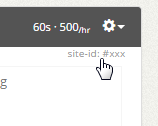
You can locate the site id of your website by expanding the website campaign panel. At the top right just above the Geo-targeting box there will be the site-id of the campaign. It is in a small gray font.
Filed under: Documentation→Getting Started
Tags: 10khits, campaign, getting started, id, site, site id, website
Why is my website campaign suspended?
10 years ago
Your website campaign can be suspended for breaking our general terms and program policy. We have the right to suspend any URL along with the related account if we see any material that is deemed illegal, suspicious, harmful or offensive in nature.
Filed under: Documentation→Getting Started
Tags: 10khits, banned, campaign, getting started, suspended, URL suspended, website
How do I increase my Maximum Hits per Hour above 500?
10 years ago
The Maximum Hits per Hour is 500 per website campaign. If you are looking for a higher maximum, you can create similar campaigns multiple times.
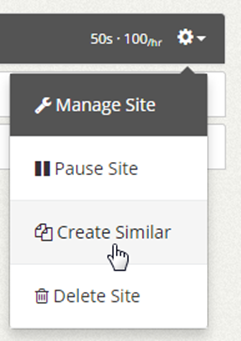
For instance, if you want a maximum of 1500 hits per hour for one website, you can use 3 website slots for that one webpage and set each maximum hits per hour to 500.
Filed under: Documentation→Getting Started
Tags: getting started, hits, hour, increase, maximum, maximum hits per hour, mhph, per, website slots
Why is my website campaign expired?
10 years ago
If you have an expired campaign, this means that your account does not have enough website slots to keep the campaigns running. Your URL slots will be downgraded if you did not pay for the booster packs or upgrade plan for the month. You can keep the campaigns active again by upgrading your plan and purchasing extra website slots again.
Filed under: Documentation→Getting Started
Tags: 10khits, campaign, expired, getting started, URL campaign expired, URL expired, website
Why does my website campaign have a warning sign?
10 years ago
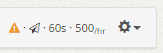
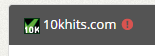
The warning sign with an exclamation is an indication that some features may not be working for the campaign. When you create a campaign on a plan like Business or Pro and your account is downgraded for example from Pro to Basic, the account will no longer have the custom traffic source feature. Even though the setting is set to enabled, it is no longer working unless you upgrade your plan to Pro or Business again. If you expand the website campaign panel with the warning sign, you’ll see which settings are not working.
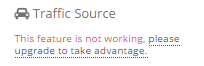
Once upgraded, the warning sign will be removed. If you do not wish to upgrade, you can also disable the geo-targeting and/or white-label traffic in the manage site settings to remove the warning sign from the campaign.
Filed under: Documentation→Getting Started
Tags: 10khits, campaign, downgrade, downgraded, getting started, upgrade, warning, warning sign, website campaign
How come I can’t resume an expired campaign?
10 years ago
An expired campaign means that the website slot has expired due to a recent downgrade of your account or the expiration of a booster pack.
You do not have enough website slots to resume the campaign. You will need to upgrade your plan or buy extra website slots again.
Filed under: Documentation→Getting Started
Tags: 10khits, expire, expired, expired campaign, getting started, resume
How come I can’t resume a suspended campaign?
10 years ago
A suspended campaign means that the website URL has violated our terms and can no longer be added to the system. The URL is permanently banned. You can submit a ticket to our system for a review.
Filed under: Documentation→Getting Started
Tags: 10khits, campaign, getting started, resume, suspended, suspended campaign, suspension, URL, website
How come I can’t add a suspended website?
10 years ago
The website URL is permanently banned from our service due to violation of our terms. You can submit a ticket to review the URL again.
Filed under: Documentation→Getting Started
Tags: 10khits, getting started, review, suspended, URL, website
My campaigns are active but I’m not receiving visitors
10 years ago
If your campaigns are active and running but you are not receiving visitors, most likely you have ran out of points. Please surf to earn points, upgrade your plan or purchase an extra points booster pack.
Filed under: Documentation→Getting Started
Tags: 10khits, active campaign, getting started, no points, no visitors, running